Wednesday, September 8, 2010

Wedding Brush Tutorial

Here's another tutorial on using Photoshop brushes. Please refer back to the "Photoshop Brushes" blog if you have any questions. Today's post is for Mary Ann from Miami, a wedding photographer. 

"Help! I need a simple elegant way to decorate a modern bridal album page."

Search online for wedding brushes, floral brushes, flourishes & swirlies so that you have a good selection to choose from. Stock images were used for this example.


Drag the images you want to use onto a white background. Resize them & move them around as needed.


This design is pretty just the way it is so you could stop now or you can emboss the design to add a custom touch to your album page.


Thanks, Mary Ann for inspiring this blog.
Please send your photo questions to:


Tuesday, September 7, 2010

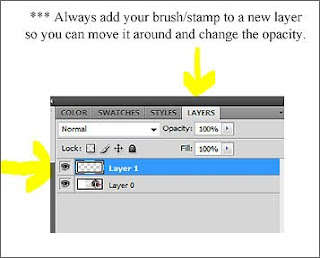
Photoshop Brushes

I was talking to a Photoshop newbie who complained -

"I just don't understand the whole Photoshop Brush thing."

Here's a quick overview for anyone else with the same problem.

One of the reasons why Photoshop Brushes can be confusing is because they are multi-purpose. You can paint with them like a regular artist's brush. You can stamp with them like a scrapbooker would use a rubber stamp. You can also scatter images randomly or leave a trail across the page.

The brush we'll be using today was downloaded from brusheezy.com. Always check the license to make sure you're not violating the copyright. Link back to the site if you're using it for a display or example and thank the designer to let them know you appreciate their work.

Here's the finished sample. I use these as marketing giveaways - my contact info is on the back.


Save to your desktop. Right click on the zipped file to extract the brush file. I'm using CS4 & all I had to do was open the unzipped file and double click on Tickets & Labels to load the brushes into Photoshop.

Open your picture in Photoshop. Add the extra white space (Image > Increase Canvas > White). Crop to resize.


Add the remaining text layers using the regular Photoshop Text tool. If you need help with enlarging & rotating text, refer back to the blog on 3D Halloween Text.


The best way to learn a new skill is to keep on practicing.
Please send your photo questions to:

Saturday, September 4, 2010

Photo Booth/Event Pictures

Sara, a young photographer from UGA, is setting up a photo booth/event photography business.

"My pictures look kind of plain. Any suggestions for making them look more like a special souvenir?"

Here are a couple of suggestions that might help.

1. http://www.dennymfg.com/  for Freedom Cloth backdrops.

2. You can buy small decorative frames from Michael's  - 2x3, 3x3 & 3x4 inches as well as the larger sizes.

3. Purchase commercial templates from Graphic Authority, Photo Duds, etc.

4. Custom design your own digital photo frames using Serif PagePlus Graphic Design software. It's licensed for commercial use and priced between $79-$99. Here are some samples that I made using their design elements.


Hallmark sells blank, precut 4x8 glossy white photo cards at the office supply stores or on their website. You could also buy heavyweight glossy photo paper & cut it to size. Hope that helps, Sara.

Please send your photo questions to -

Friday, September 3, 2010

Desktop Publishing

Dan, a professional photographer from Illinois, wants to know -

"Why can't I sell the photo products I create with Print Artist?"

Desktop publishing software is licensed for either personal use or commercial use.

The consumer level programs like Print Artist are licensed for personal use. They are relatively inexpensive and are used to create personalized greeting cards, invitations, flyers and newsletters.

Small business owners can use them to create their own business cards, stationary & business forms, marketing materials, ads, brochures & catalogs. You cannot use consumer level programs to create items to sell to other people. You need to purchase a commercial use program for that.

Commercial Graphic Design Programs are more specialized & usually more expensive...but not always. Here's a list of commercial graphic design programs you can use to create items to sell.

Page Layout Programs -
Adobe InDesign
Quark Express
Serif PagePlus
Scribus *free

Illustration -
Adobe Illustrator
Corel Draw
Inkscape *free

Photo Editors -
Photoshop
GIMP *free

Click on this link for more information:
http://desktoppub.about.com/od/faq/ss/Readers-Choice-Desktop-Publishing-Finalists.htm
Serif PagePlus won the Reader's Choice Award for commercial desktop publishing programs. Priced at a very reasonable $69.99, it sounds too good to be true. I immediately went to their website and downloaded a free trial version. I'll let you know how it works out.

Thanks, everyone! Send your photo questions to -
karenmillerphoto@gmail.com

Thursday, September 2, 2010

Photoshop 3D Halloween Text

Several people from http://www.photographyschoolhouse.com/ have asked how to create the 3D Halloween text I used in the last Photoshop challenge. Here's the picture & here are the steps I used.

P.S. Original challenge picture supplied by Michelle.


Download the free Creepsville Halloween font at www.dafont.com/creepsville.font   Save the file to your desktop. Right click on the zipped file to unzip the file. Open the file and right click on the font to load it so you can use it in Photoshop.


If your text or your pictures look soft or fuzzy after resizing for the web go to:
 Filter > Sharpen > Unsharp Mask
500  .2  0

Thanks, everyone!  Send your photo questions to:

For those of you who are not members of http://www.photographyschoolhouse.com/ 
Join!   Post!   Participate!

Countertop Marketing Display

This post is for Lisa, a friend of a friend in California. Lisa is putting together a marketing presentation for her pet photography business and needs help with a countertop display.

"Karen, I'm using your idea for the pet modeling agency but desperately need some help with display ideas. Could you please post some samples?"

Lisa, stop by your local office supply store & pick up several 8.5 by 11 clear plastic countertop sign holders with business card holders in the bottom right corner. You can have signs printed up by your local printer or make them yoursef using Print Artist & premium, heavy, double sided brochure-type ink jet paper.

Here are some cross marketing display samples for grooming shops, animal hospitals & boutique pet stores. Make sure your marketing style enhances your business & the business you want to cross market with. Because pets are like kids you can choose from a variety of styles...child-like to modern or even elegant.


Marketing samples can be vague as to details but when you print these up for the real event make sure you include the exact date & time as well as location, directions & contact info.


Here are some bookmark sized handouts that I stack in a clear plexiglass pen holder next to the display - make sure you include your website.


Hope these samples will get your creative juices flowing. Good luck, Lisa!

Remember - You can use Print Artist to create marketing materials & giveaways but you cannot sell the items you create using Print Artist. It violates their license.

Send your photo & marketing questions to karenmillerphoto@gmail.com

Wednesday, September 1, 2010

Sport Picture Ideas

Jan, a photographer in Michigan, is looking for inexpensive sport picture ideas. She works at a small Christian school as an office assistant and school photographer. The sports are mainly soccer, baseball & basketball. They have a small budget and do not want to charge the parents for the pictures.

Many large commercial labs have free sports templates and inexpensive processing. If you're looking for something different or you want to involve the students in the creative process, try using the same products we used in August for the photo thank you card. Remember, you can use Print Artist for marketing purposes or for school giveaways but you cannot sell the items you create using Print Artist. It violates their license. 


Add your pictures to the photo frame templates or use the packaged clip art for a custom look.


Best of all, you can take pictures in the morning and have sports cards & team pictures ready to give out that afternoon. Good luck, Jan!

Email me at karenmillerphoto@gmail.com with all your photo questions.